
Read Progre
Building a sustainable reading habit is difficult, as you sometimes forget your reading progress. Therefore, our team has come up with a simple and free solution for book readers in the form of the Read Progre App. This app allows users to track their progress, set goals, and find new reads.
Rated 4.8 (23.3k)
Read Progre
2.0
com.read.progre
Rana Alamgir Hussain
Android 6.0 and Up
Reference
36.6 MB
It is an all-in-one app for avid readers. There are so many useful features for the readers. So, in today's article, I am going to give you an overview of this app and its highlighted features. Thereafter, you can download the app and use it on your iPhones, Macs, iPads, and Android devices.
What is Read Progre?
Read Progre is a mobile application designed to make reading easy and fun for the avid-readers. It helps readers set goals for the books they are reading and can track their progress. Moreover, users can discover new reads using the same app, as it has a huge library of books for users.
It is perfectly crafted for the reading enthusiasts and can be used anywhere in the world. The purpose of the app is to help people build a reading habit, which can be difficult for newbies without the app. It makes reading quite convenient and joyful for the readers. Therefore, they gradually build a habit.
Whether you are a student or a casual reader, it is designed for everyone. Students can add the progress of their subjects within the app and track topics. Whereas, the casual readers can also benefit from the app in the same way. So, the main purpose is to help readers create consistency in their reading.
Users can have options like creating logs, adding reading sessions, tracking pages, setting limits, and a few more. So, if you want to acquire these amazing features right on your Android or iOS phone, download the app from our page and install it. There are no charges or hidden features in the app.
Main Features
Since the Read Progre iOS app comes with so many benefits for the users, it is hard to explain each one of them. However, here are some highlighted features that can give you an overview of the app. Let's explore these features below.
Reading Progress Tracker
The app allows users to log pages, or it automatically calculates the progress of their reading. Therefore, it tracks the progress and notifies the users where they left off reading and how much time they spend on that specific subject.
Setting Goal
Whether you want to read daily, every week, or every month, it is your choice. So, you need to make plans and set goals for yourself. It allows you to set daily, weekly, and monthly goals. Moreover, you can get reminders for the goals you have added.
Visual Analytics
View charts and graphics of how much time you have spent on a specific book. Also, you can see the visual stats for reading speed in the form of graphs. So, this visual analytics of the app helps you to improve your speed and overall reading habits.
Reading Streaks
The app allows you to set goals, achieve those goals, and celebrate. So, you can pick some books, add to the app, read consecutively, and celebrate. This feature of the app helps you to build a sustainable reading habit, and you can improve the consistency.
App Screenshots
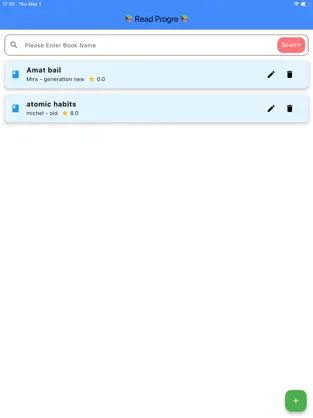

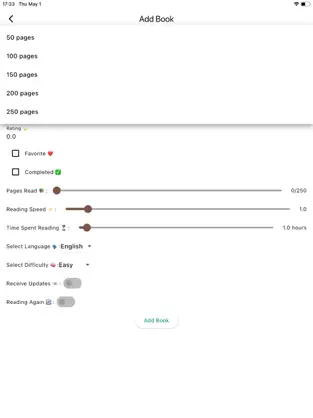
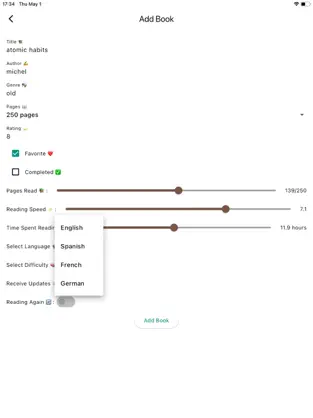

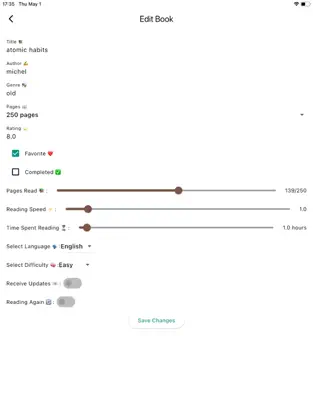
How to Download and Install the Read Progre App on Android?
To download and use the app on your Android, you need to install an iOS emulator on your Android phone. Read Progre iOS App is not available for Android, still you can easily and safely use it via an emulator. Here are the steps that you can follow and use that app on your Android.
1
Download and install an iOS emulator for Android, which allows your phone to run apps made for iOS. A few of these tools include Cycada and iEMU.
2
Install any of your desired emulators on your Android.
3
Now download the Read Progre app from our page on your Android phone.
4
Open the emulator and find the Read Progre iOS app you have downloaded from our page.
5
Tap on it and wait for a few seconds to let the tool process the file.
6
Tap on the install button.
7
Done.
8
Open the app.
9
Use it.
Since the app is available for iPhones, iPads, and MAC devices, you can download the app from our page. Later on, install it on any iOS device you want to.
Frequently Asked Questions
Is the Read Progre app free to use?
Is the Read Progre app available for iOS phones only?
Can I use the Read Progre app on Android phones?
Is it the mod version of the Read Progre app?
Final Words
The Read Progre app is not only beneficial for the students, but also for the casual readers. So, download the app on your Android or iOS phone to start tracking your reading progress and set goals. If you are new and want to build a sustainable reading habit, this app is a must for you. We have provided the download link for the official and original app on this page.